ICEYE offers access to Hurricane Rapid Impact / Cyclone Rapid Intelligence via multiple delivery channels. Channels supported today are presented in the table below and details are provided in the following sections. If a desired delivery channel is not included in the below list, reach out to ICEYE's Customer Success team to inquire on the possibility of adding it.
| Delivery Method | Description |
|---|---|
| ICEYE Solution Suite File Delivery API (preferred method) | Machine-to-machine access to all releases as they happen, enabling seamless integration with user systems to receive data as it is released for each event. |
| ArcGIS Online (Viewer / Data Sharing) | Utilizing ArcGIS Online, ICEYE provides users with instant access to a visualization of the event as it happens. ICEYE can provide ArcGIS Online accounts for users who do not use Esri, but for users with existing access, group sharing can be configured so the user can utilize the hosted data in their applications. |
| Partner Platforms | ICEYE is continuously expanding access to its partner network. Reach out to ICEYE's Customer Success team to check if the user's partner platform is currently supported. |
Solutions Suite File Delivery API
Users can search for available data using the find-deliverables endpoint in ICEYE's Solutions Suite. This endpoint allows you to query based on date, area of interest, or peril and returns a list of available deliverables matching the query parameters. For an exhaustive list of parameters, please refer to the API Specification. The response contains the deliverables metadata as well as download links. The deliverables listed in the response are also controlled by account permissions.
Parameters: Date
Filters the results to those published within the specified time window. Both published_after and published_before are optional and accept ISO-formatted timestamps. Timestamps with fractional seconds will return an error. In other words, 2024-01-01T00:00:00Z and 2024-01-01T00:00:00.000Z are valid but 2024-01-01T00:00:00.001Z is not. The available data catalog starts in April 2024.

Parameters: Area of Interest
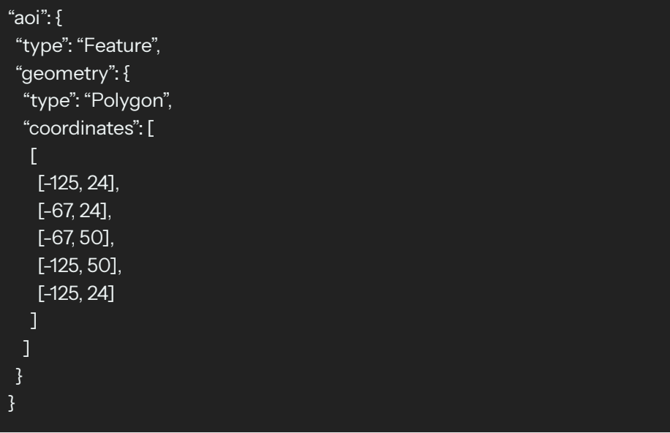
Filters the results to those that intersect the specified area of interest. The area of interest should be provided in the request body in Polygon/MultiPolygon GeoJSON geometry. Not specifying an area of interest will return results globally.
Parameters: Peril
Filters the result to just the specified perils, or just individual deliverables. For example, you can request just the hurricane damage hexgrid deliverables instead of all deliverables related to hurricane. Certain deliverables have additional options such as file type.
Available Deliverable Types (under Peril Type "cyclone", used for both products):
cyclone_building_damage— file_type:geopackagecyclone_damage_raster— file_type:rastercyclone_damage_vector_hexgrid— file_type:geopackagecyclone_release_notes— file_type:geopackage
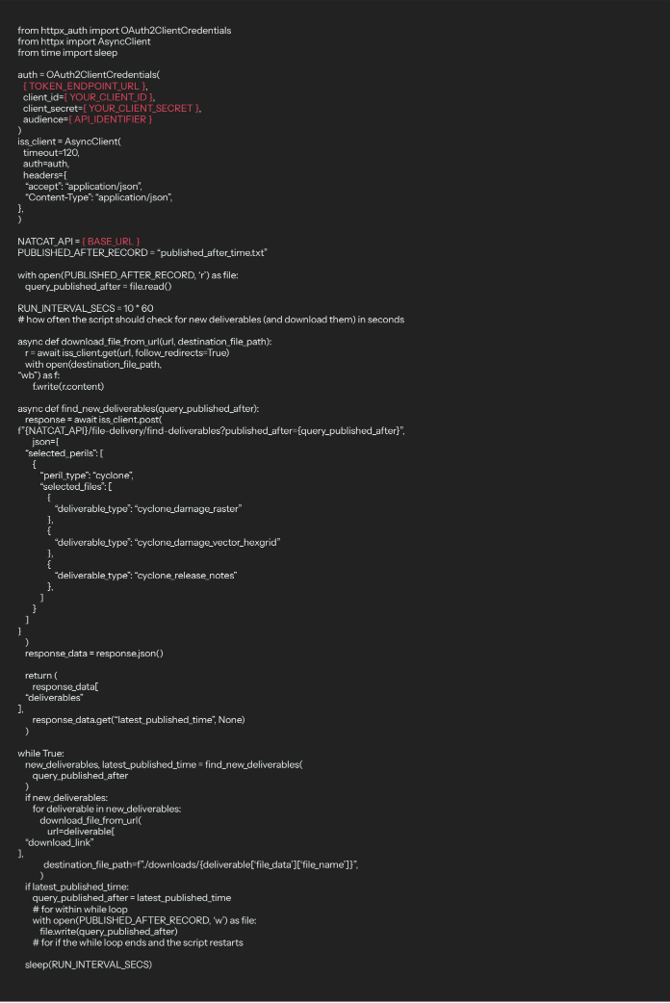
Example workflow: Automatically download all deliverables of interest as they are published
By periodically querying the endpoint for deliverables published since the last query, you can set up automation to download new deliverables as they are released.
US:
- Set up the request payload parameters to query for deliverables of interest e.g. hurricane damage hexgrids
- Query find-deliverables with a recent timestamp for the
published_afterparameter. - Loop through the download links of any deliverables returned.
- Save
latest_published_time. - Pause for some time.
- Query find-deliverables with the saved
latest_published_timeas thepublished_afterparameter. - Repeat steps 3-6.
Australia:
- Set up the request payload parameters to query for deliverables of interest e.g. cyclone damage hexgrids
- Query find-deliverables with a recent timestamp for the
published_afterparameter. - Loop through the download links of any deliverables returned.
- Save
latest_published_time. - Pause for some time.
- Query find-deliverables with the saved
latest_published_timeas thepublished_afterparameter. - Repeat steps 3-6.
The sample on the following page is intended solely for illustrative purposes. We do not commit to updating this with every API change and we do not guarantee the functionality, performance, or suitability of the code for any particular purpose.